


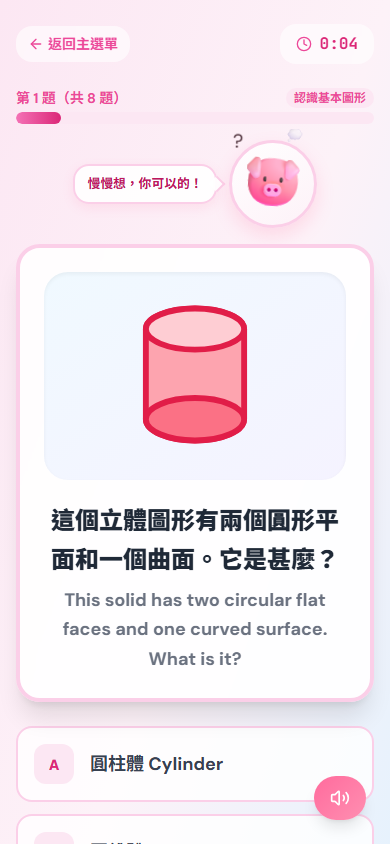
Visual shapes
Understand the question
Bilingual prompts and visual cues help children confirm what they need to solve first.
A bilingual app for Hong Kong P1–P6 families: children practise in short missions while parents see mistakes and progress at a glance.FunPlanet is a bilingual learning app for Hong Kong P1–P6 families. Children complete short, graded practice across six subjects—or turn their own materials into AI questions with explanations and source evidence—while parents can see mistakes, accuracy, and learning trends.

Today, we launch from Earth
P4 Math · Word problems
P1–P6
Grade-based learning
6 subjects
Math, languages, science and more
Bilingual
Chinese and English
Real product screens
These screens are captured from the current 390×844 product build. They show three real question types—visual shapes, place-value input, and vertical calculation. Store links will activate here when the app is live.
Visual shapes
Bilingual prompts and visual cues help children confirm what they need to solve first.
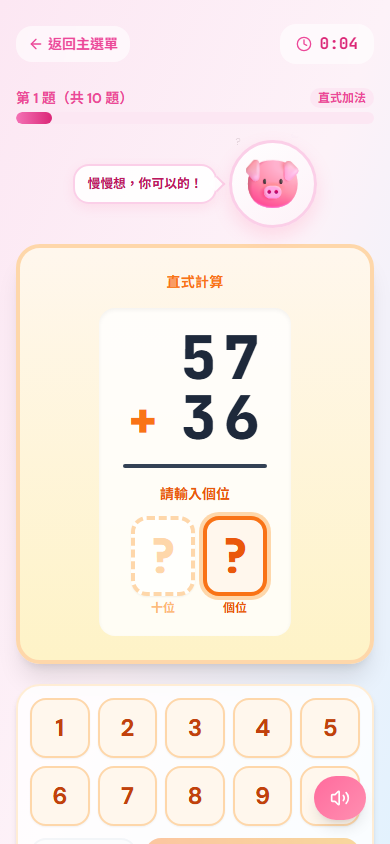
Place-value input
Place-value input makes the method visible, so learners can work at their own pace.
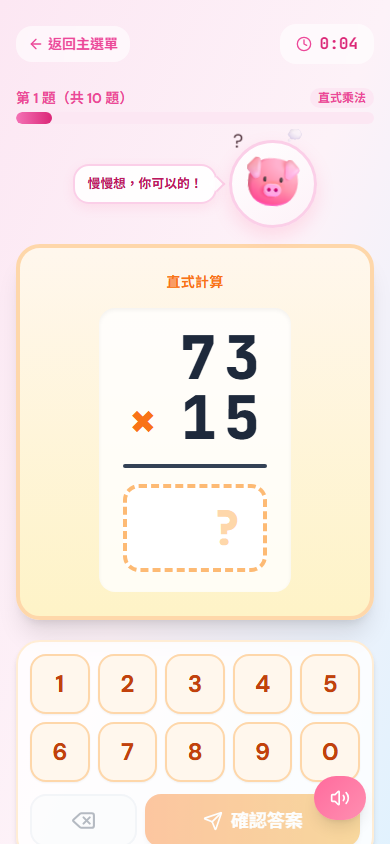
Vertical calculation
Question and timer cues keep the goal clear, with room to practise again when needed.
01
Read the bilingual cue and visual, then confirm what needs solving.
02
Use place-value or vertical-calculation screens to make the method visible.
03
A compact question set and progress cue make the next step clear.
Fun for learners. Clear for parents.
Every feature makes the next step obvious for children and keeps real learning visible for parents.
Six subjects, multiple difficulty levels, and varied question types help every learner start at the right place.
Upload a PDF, document, or image you are allowed to use. AI identifies topics and creates repeatable practice.
Review missed questions with explanations and progress trends to find the topics that need more attention.
Regular and AI practice earns XP that powers a journey through planets, rockets, and imaginative space companions.
Three simple steps
01
Pick a grade, subject, and difficulty, or create practice from your own material.
02
Immediate feedback, explanations, and mistake tracking make improvement clear.
03
Practice becomes XP and journey progress, so the next goal is always visible.
Made with parents in mind
The game layer motivates. The content, explanations, and progress remain clear and reviewable.
Uploads create personal practice. Deleting material also removes its related files and practices.
AI material practice can show explanations and source evidence, helping learners understand rather than memorise.
Reports organise recent attempts, accuracy, and topic performance into a useful learning picture.
Promises you can check
The product screens and public documents below are available to check. We do not publish unverified ratings or download counts.
The captures below preserve the full 390×844 mobile frame from the current question flows.
See the real screensSee how accounts, learning material, and study data are handled.
Read the privacy policyReview membership, subscriptions, account deletion, and AI boundaries.
Read the termsOpen the public API response to confirm the service and database status.
Open health checkFunPlanet Mobile
Versions for iPhone, iPad, Android phones, and tablets are in preparation. Store buttons will activate when links are live.
Want to hear when we launch? Contact support@funplanet.io